Keys and security
A key is the password your app uses to reach a service such as Ziina, UAE PASS or ChatGPT. TatbiQ encrypts every key you paste, keeps keys out of your app's pages, and puts them only where your app's server needs them.
Where your keys are kept
You paste keys only in the Integration Hub's Connect screen. TatbiQ encrypts them before saving, and keeps one copy for your workspace so any of your apps can use it.
The Hub never shows a saved key again. A saved field reads •••• saved · encrypted, with the hint "Saved. Leave blank to keep it." To change a key, paste the new one; see Replace your key.
Your keys stay on the server
Your app's pages never contain a key. For each service, TatbiQ adds a small server function to your app's backend. The function keeps the key as a private setting, and your pages ask the function, which then calls the service. Your code and its GitHub copy hold only the function's address.
This is why a service needs your app's backend first. See Your app needs a backend first.
| Service | What its server function checks |
|---|---|
| Ziina | Every payment message from Ziina carries a signature. The function checks it, so no one can fake a paid order. |
| UAE PASS | Each sign-in must come back to a request your app started, so a sign-in can't be replayed or forged. |
| ChatGPT, Gemini | Answers only your app's preview and published addresses, and only the AI models you allowed. |
App keys in Settings
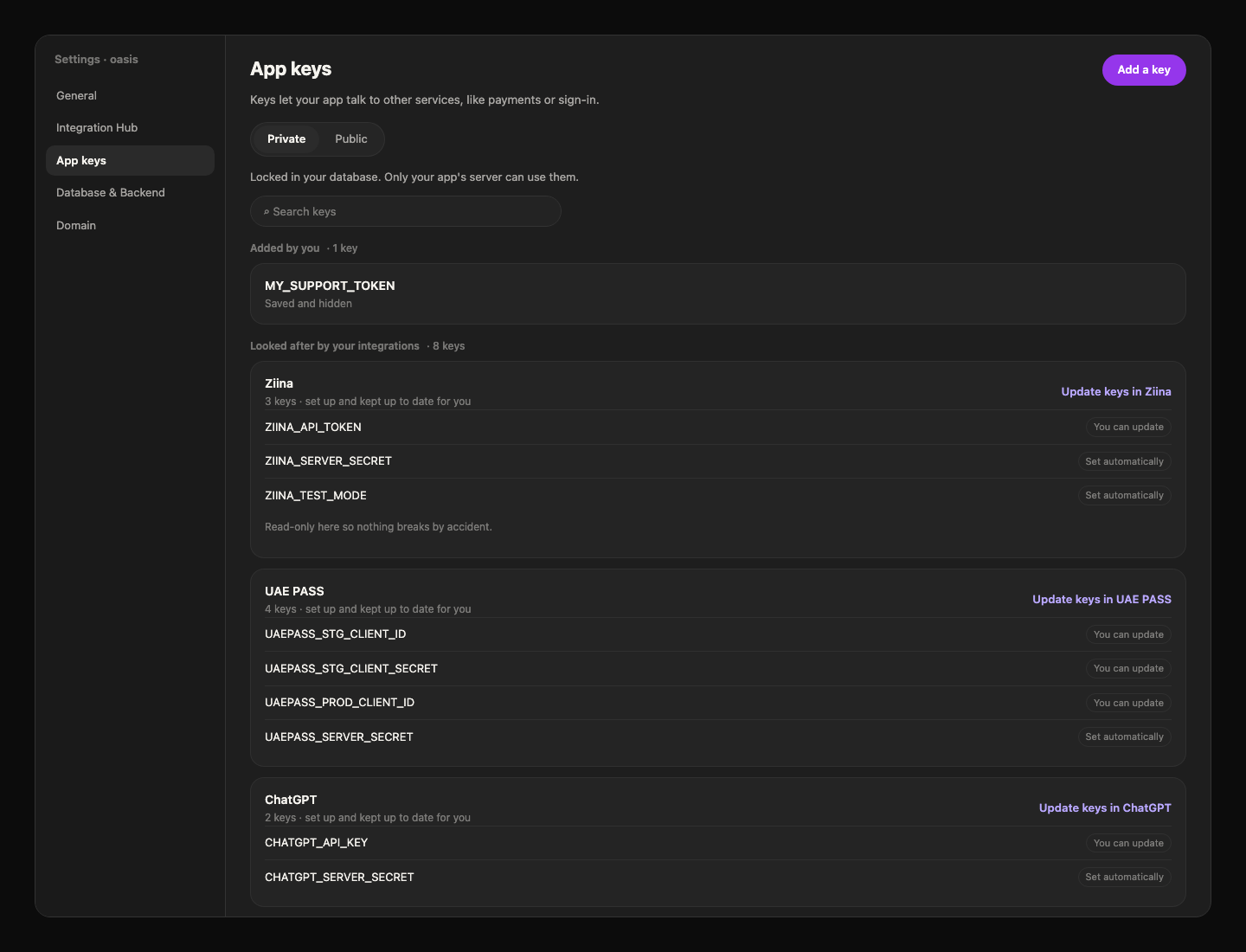
Open Settings, then App keys, to see every key your app uses. Keys that come from the Hub are listed under Looked after by your integrations:
- Private keys show their names only, never their values.
- Each is marked You can update (you pasted it) or Set automatically (TatbiQ made it).
- They're read-only here, "so nothing breaks by accident". Select Update keys in followed by the service to change them in the Hub.
Keys you add yourself show Saved and hidden, and you can replace or delete them in App keys.
AI usage limits
ChatGPT and Gemini bill every answer to your own AI account, in test and live alike. TatbiQ adds these limits to your app:
| Limit | What it does |
|---|---|
| Per visitor | Each visitor gets up to 20 answers every 10 minutes. After that they see "The AI is busy right now. Please try again in a moment." |
| Only signed-in people can use AI? | Choose Yes to keep the AI for people signed in to your app. |
| Models | The function refuses any model you didn't pick under Which OpenAI models may this app use? (or the Gemini question). |
These limits don't cap your bill. Use an AI project just for this app and set a monthly spend limit on it (OpenAI) or a spend cap (Google AI Studio) before you share your app.
The server function logs only counts and token numbers, never the questions or answers. A chat's messages are saved only if you chose Remember across visits, and then in your app's own database.
When you remove a service or delete a key
| You select | This app's copy | Your workspace copy | At the service |
|---|---|---|---|
| Replace key | Gets the new key | Replaced | The old key still works until you delete it there |
| Remove from this app… | Deleted, with the server function | Kept for your other apps | No change |
| Delete key… | Deleted from every app | Deleted | No change |
TatbiQ never cancels a key at the service. To stop a key working everywhere, delete it in the service's own dashboard too.
Rotate a key
Rotating a key means swapping it for a new one. It's good practice to do it from time to time, when someone who had access leaves your team, or when a key was shared by mistake.
Create a new key in the service's dashboard.
Select Manage, then Settings, then Replace key, and paste the new key. Every app that uses it gets it.
Delete the old key in the service's dashboard so only the new one works.
Pasted a key into chat by mistake? Rotate it. Chat messages are saved with your project.
FAQ
Is my key in my app's code or on GitHub?
No. Your pages and files hold only the address of the server function. The key stays in your app's backend.
Why can't I edit an integration's key in App keys?
Those keys are read-only there so nothing breaks by accident. Change them in the Integration Hub, which updates every app that uses them.
Does the visitor limit apply to me in the preview?
Yes. Everyone who uses the AI in your app, including you in the preview, gets up to 20 answers every 10 minutes.
Does removing a service cancel my key?
No. TatbiQ deletes its copies, but the key still works at the service until you delete it in the service's dashboard.